
Track Goals with Streaks & Custom Habits
Overview
Accountability Tracker is a lifestyle-focused desktop application designed to support users in building consistent habits and achieving personal goals. The software enables individuals to monitor daily, weekly, or monthly recurring habits across various life domains, including health, productivity, and mindfulness. By emphasizing streak tracking and visual progress indicators, the app helps users maintain motivation and accountability over time.
It is particularly suited for individuals engaged in self-improvement journeys, those following frameworks like Atomic Habits, or anyone aiming to develop long-term behavioral changes. The software’s core purpose is to simplify goal tracking through intuitive design and customizable routines. While the developer, AppTastic, is listed, no further details about the company’s background are available.
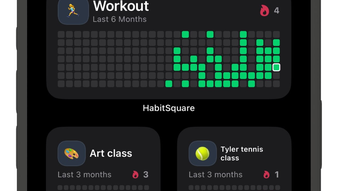
The app is available for iPhone users, suggesting it is optimized for mobile use, though a desktop version is implied in the product title. Real-world usage scenarios include tracking morning routines, reading goals, fitness habits, or journaling practices. Users can set recurring tasks with custom reminders and view their progress in a clean, grid-based layout.
Key Features & Capabilities
- Custom Habit Scheduling: Users can define habits to recur daily, weekly, or monthly, allowing flexibility for both routine and occasional goals.
- Streak Tracking: The app maintains a continuous count of consecutive successful completions, reinforcing consistency and encouraging long-term engagement.
- Activity Grid View: A visual calendar layout displays completed tasks, enabling users to see patterns and progress over time.
- Personalization Options: Each habit can be assigned a unique emoji icon and color, enhancing visual identification and personal connection.
- Reminder System: Customizable alerts help users stay on track by prompting them to complete their daily or scheduled habits.
- Flexible Goal Categories: Supports a wide range of personal development areas, including health, learning, mindfulness, and productivity.
These features collectively support users in maintaining discipline and visualizing progress. For example, a user aiming to read 10 pages daily can set a habit with a book emoji and a weekly reminder, then monitor their streaks in the grid. Similarly, someone building a meditation habit can schedule it weekly and track their consistency over months. The combination of visual feedback and customizable triggers helps reduce friction in habit formation.
User Interface, Workflow & Performance
The user interface appears to be clean and focused on usability, with a grid-based layout that emphasizes visual tracking. Navigation is likely intuitive, allowing users to access habits, view streaks, and adjust settings with minimal steps. The workflow is designed around habit completion, with a clear path from setup to daily use.
While specific details about performance metrics such as CPU or RAM usage were not provided, the app’s lightweight size of 45.8 MB suggests efficient resource management. The developer did not specify resource usage details. Based on general software behavior patterns, the app is expected to operate smoothly on supported devices.
Stability is likely maintained through regular updates, though no information on crash rates or update frequency was shared. The interface likely supports touch-based interaction, given its iPhone compatibility. Overall, the design prioritizes clarity and ease of use, minimizing cognitive load during daily tracking.
Compatibility & System Requirements
Accountability Tracker is designed for iPhone devices, indicating compatibility with Apple’s iOS ecosystem. The software version is listed as 1.0.0, and the installation size is 45.8 MB. No additional system requirements were specified, and exact hardware requirements are not available.
The developer did not provide information about minimum iOS versions or device compatibility beyond iPhone. Platform compatibility information is limited. Users should ensure their device meets Apple’s standard requirements for running modern iOS applications.
The software is not available for Windows or Mac systems based on the provided data. For desktop users, the availability of a compatible version remains unclear. The app is intended for mobile use, but the product name suggests a desktop application, which may indicate a future release or a naming inconsistency.
Pros and Cons
Pros
- Intuitive interface focused on visual progress tracking
- Flexible habit scheduling with daily, weekly, and monthly options
- Streak tracking encourages long-term consistency
- Highly customizable with emoji and color options
- Free to download and use with no in-app purchases mentioned
Cons
- No information on desktop or cross-platform availability
- Exact system requirements and iOS compatibility details not provided
- Limited to iPhone users; no Mac or Windows support confirmed
- No details on cloud sync or backup functionality
- Performance under heavy usage not documented
FAQ Section
Is Accountability Tracker available for Windows or Mac?
Based on the provided information, the software is currently designed for iPhone users only. There is no confirmed availability for Windows or Mac operating systems.
Is the app safe to download and use?
The app is published by AppTastic and is available through official iOS channels. As it is free and does not require sensitive permissions, it is considered safe for standard use. However, users should verify the source through the official App Store.
Does the app require an internet connection?
The app functions primarily offline, allowing users to track habits without an active internet connection. However, some features like syncing across devices may require connectivity, though this was not specified.
How often are updates released?
Information about update frequency was not provided. Users should check the App Store for the latest version and release notes.
Can I use the app without an account?
Yes, the app does not require a login or account creation. All data is stored locally on the device, which enhances privacy but limits cross-device access.
Final Thoughts + CTA
Accountability Tracker offers a focused, user-friendly approach to habit tracking with strong visual feedback and customization. Its core strength lies in streak tracking and flexible scheduling, making it ideal for individuals committed to self-improvement and daily discipline. While the lack of desktop availability and limited system details are notable drawbacks, the app’s simplicity and free access make it accessible to a wide audience.
For iPhone users seeking a lightweight, no-frills tool to build lasting habits, this software delivers tangible value. The personalization features and clean interface enhance engagement, supporting long-term use. Despite some gaps in technical transparency, the app remains a solid choice for those prioritizing consistency and motivation.
Download Accountability Tracker now to start building better habits today.







